- Jun 19 Mon 2017 11:38
-
各國國碼及手機格式
- Jun 18 Sun 2017 12:46
-
[開箱]摺疊電腦桌LY-NB24

因緣際會家裡買了一個摺疊電腦桌。對於一個常窩在床上打電腦看動畫的巴哥來說,覺得實在太好用了,所以大部分時間都被我佔用著
當時在選購的時候看到各式各樣的摺疊桌,後來只是因為看到這個最便宜就買了(下圖來自網購示意圖)
- Jun 06 Tue 2017 17:04
-
新舊版Xcode共存
指定使用XCODE目標
sudo xcode-select -s /Applications/Xcode.app
sudo xcode-select -s /Applications/Xcode7.app
sudo xcode-select -s /Applications/Xcode.app
sudo xcode-select -s /Applications/Xcode7.app
- Apr 20 Thu 2017 12:46
-
解決 IOS XCODE 網頁請求失敗 NSURLErrorDomain Code=-1022
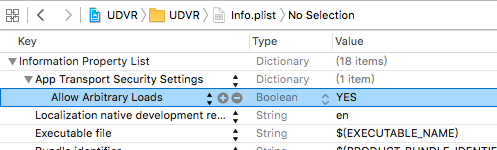
使用IOS要送出網頁請求,卻一直收到NULL,後來攔截到ERROR CODE 是-1022
錯誤訊息為The resource could not be loaded because the App Transport Security policy requires the use of a secure connection.
- Apr 18 Tue 2017 21:52
-
[開箱]小米手環2 介紹及使用心得

- Apr 18 Tue 2017 15:44
-
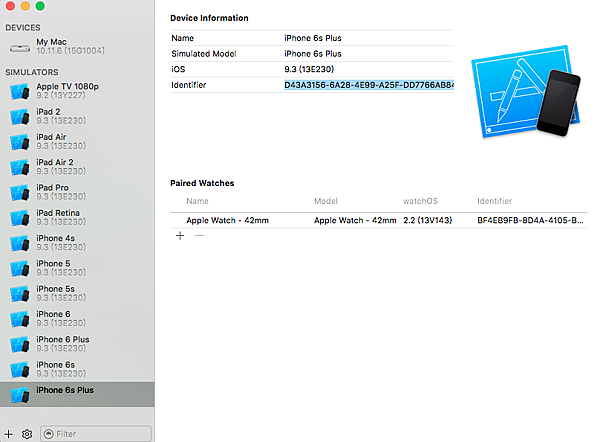
IOS Packet Tracing Using RVI
- Apr 12 Wed 2017 09:39
-
QNAP PHP Server 解決延遲更新
It's PHP OPcache which is set by default ON with a 60 second timestamp check for edits on the files.
Since the QNAP php.ini config gets overwritten if you edit using the web interface, what you need to do is access via SSH and edit the php.ini located in these directories:
/etc/default_config/php.ini
/mnt/HDA_ROOT/.config/php.ini
And add the following in the Opcache section:
opcache.enable = 0
opcache.validate_timestamps = 0
Since the QNAP php.ini config gets overwritten if you edit using the web interface, what you need to do is access via SSH and edit the php.ini located in these directories:
/etc/default_config/php.ini
/mnt/HDA_ROOT/.config/php.ini
And add the following in the Opcache section:
opcache.enable = 0
opcache.validate_timestamps = 0
- Jan 29 Thu 2015 02:03
-
[Rsync]解決使用DeltaCopy同步後檔案權限不足問題

附註:本文僅屬記錄與經驗分享且在非乾淨電腦中安裝,若有遺漏或錯誤煩請指正,如有侵權請來信告知。
[expand title="發表日期:2015/01/29 最後更新:2015/01/29" alt="點選觀看詳細更新記錄"]
2015/01/29, 新增文章
- Jan 29 Thu 2015 01:23
-
[Windows]移除Windows服務 - 以DeltaCopy為例
![[Rsync]解決Could not start the service問題](http://robarter.servehttp.com/wordpress/wp-content/uploads/2015/01/EditWindowsService.png)
附註:本文僅屬記錄與經驗分享且在非乾淨電腦中安裝,若有遺漏或錯誤煩請指正,如有侵權請來信告知。
[expand title="發表日期:2015/01/29 最後更新:2015/01/29" alt="點選觀看詳細更新記錄"]
2015/01/29, 新增文章
- Jan 28 Wed 2015 20:55
-
[Rsync]解決Could not start the service問題
![[Rsync]解決Could not start the service問題](http://robarter.servehttp.com/wordpress/wp-content/uploads/2015/01/EditWindowsService3.png)
附註:本文僅屬記錄與經驗分享且在非乾淨電腦中安裝,若有遺漏或錯誤煩請指正,如有侵權請來信告知。
[expand title="發表日期:2015/01/28 最後更新:2015/01/28" alt="點選觀看詳細更新記錄"]
2015/01/28, 新增文章
- Jan 28 Wed 2015 18:15
-
[Rsync]開啟服務無法連線,設定Windows通過防火牆

附註:本文僅屬記錄與經驗分享且在非乾淨電腦中安裝,若有遺漏或錯誤煩請指正,如有侵權請來信告知。
[expand title="發表日期:2015/01/28 最後更新:2015/01/28" alt="點選觀看詳細更新記錄"]
2015/01/28, 新增文章
- Jan 27 Tue 2015 00:29
-
[Android]解決Android Studio 1.0.1 APK 無法安裝問題
附註:本文僅屬記錄與經驗分享且在非乾淨電腦中安裝,若有遺漏或錯誤煩請指正,如有侵權請來信告知。
[expand title="發表日期:2015/01/27 最後更新:2015/01/27" alt="點選觀看詳細更新記錄"]
2015/01/27, 新增文章
[expand title="發表日期:2015/01/27 最後更新:2015/01/27" alt="點選觀看詳細更新記錄"]
2015/01/27, 新增文章
